Survey, Report, and Price Remedial Works in One Visit
IgnisTrack is purpose-built for fire door surveyors. Inspect every door to BS 8214, generate a comprehensive PDF report with photos and defect details, and produce an accurate Bill of Materials for pricing remedial works — all before you leave site.


You Survey Doors Twice — Once on Site, Again at Your Desk
Scribble notes on site, take photos on your phone, then spend the evening typing up reports in Word and pricing remedial works in spreadsheets. Every job gets done twice. IgnisTrack means you only do it once.
Report Writing Hell
Handwritten notes on site, then hours typing them up. Photos scattered across your camera roll, separated from survey data. Formatting in Word or Excel.
No Signal, No Survey
Basements, plant rooms, older buildings — most fire door apps need internet. You lose your work when signal drops. Or you can't start at all.
Pricing Remedial Works Is a Second Job
Back at your desk counting defects, working out hinge sizes, seal widths, and closer types. Building material lists and labour estimates in spreadsheets. Under-quote and you lose money. Over-quote and you lose the job.
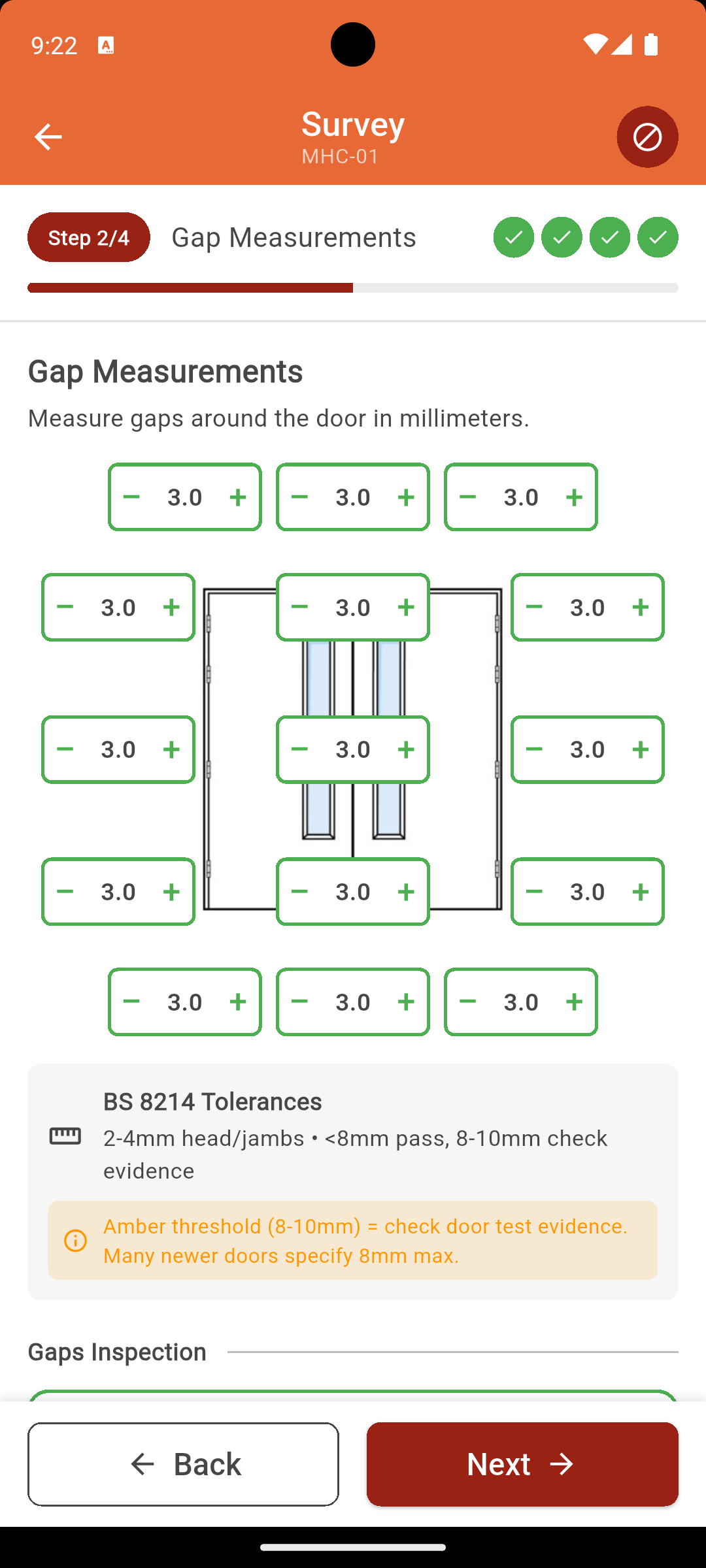
BS 8214 Compliant 4-Step Fire Door Survey
Our guided workflow ensures every inspection is thorough and consistent. Follow BS 8214:2016 code of practice with built-in validation at every step.
Door Information
Configuration, fire rating, dimensions, evidence level, special features
Gap Measurements
Visual interface with auto pass/fail, smoke door detection, traffic light indicators
Component Inspections
12 components, defect codes, failure photos, repair specifications, materials
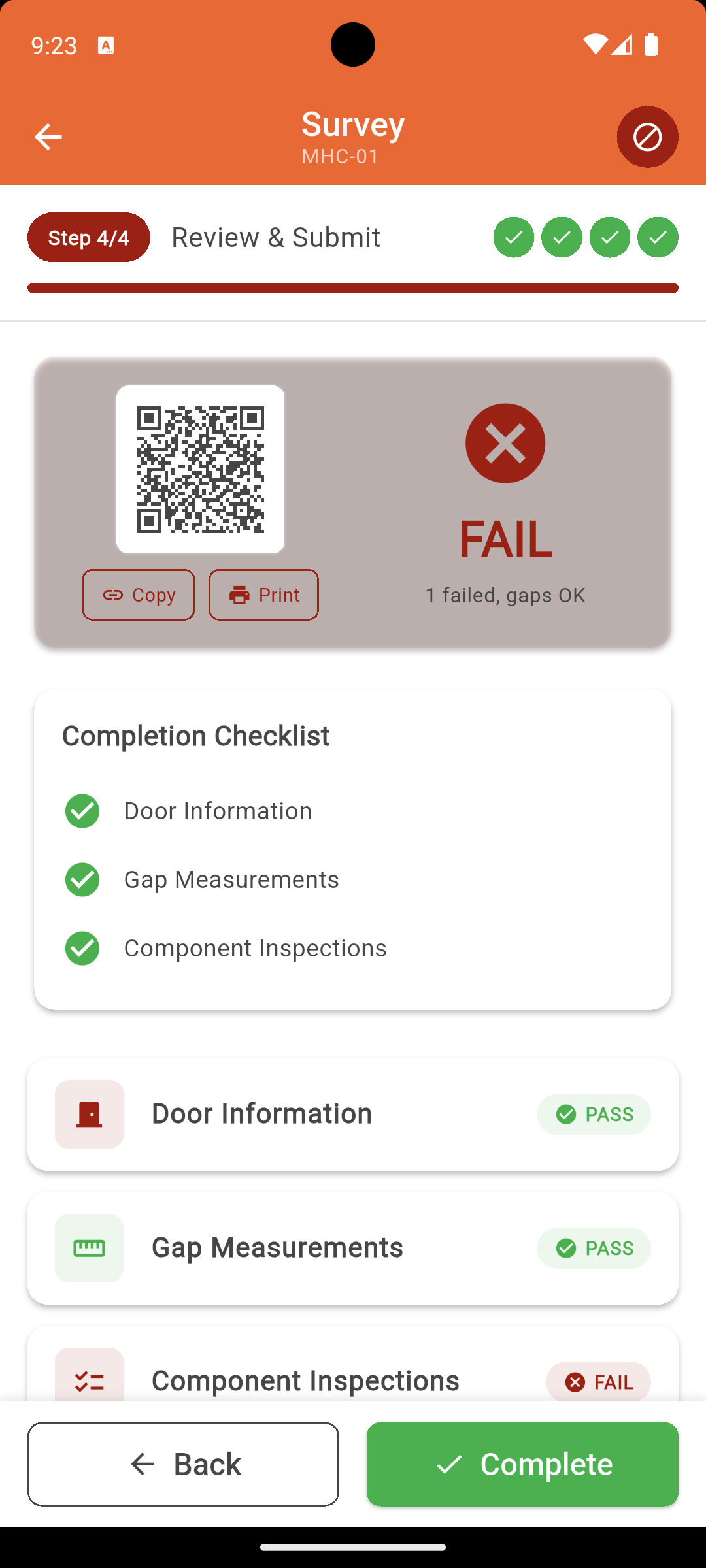
Review & Submit
Overall result, surveyor notes, QR code, instant PDF report generation
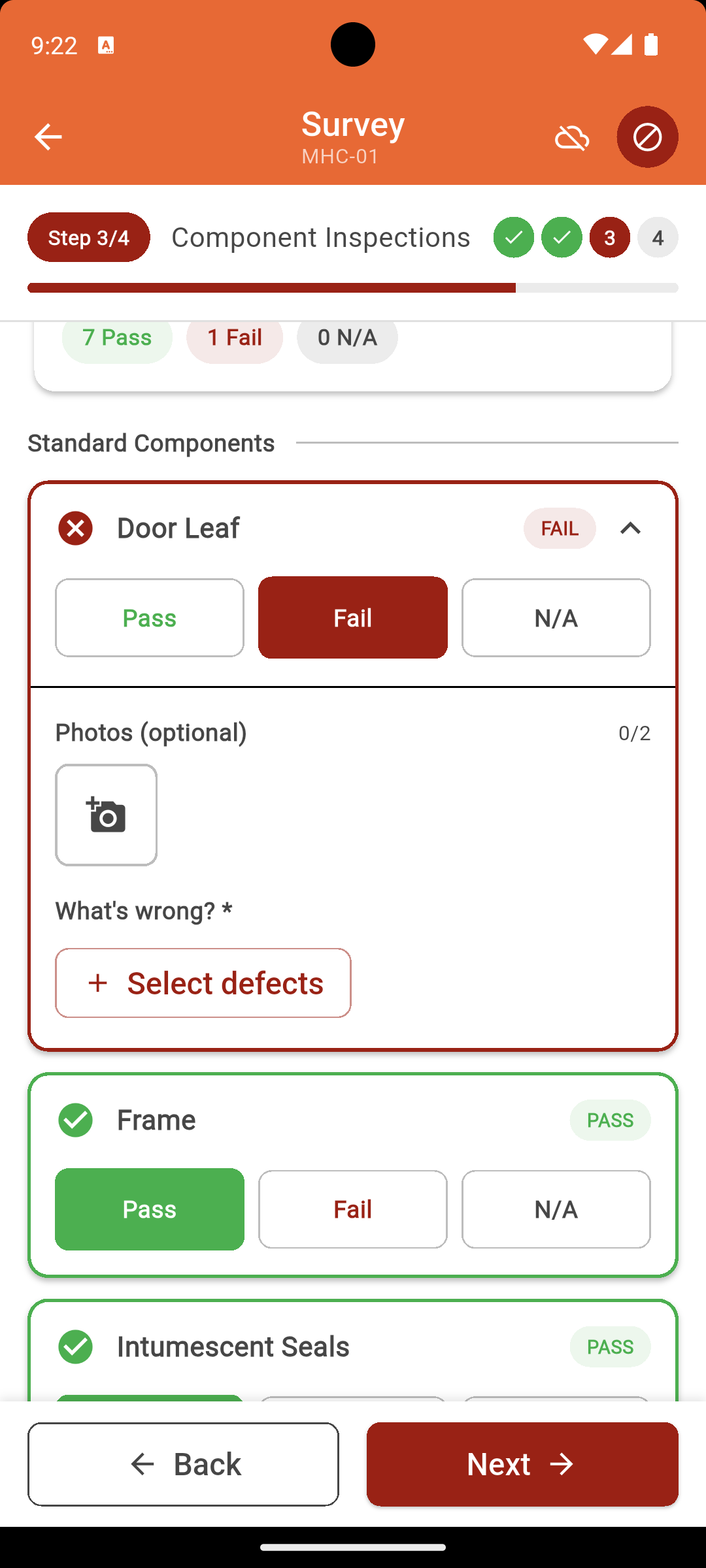
Works Offline in Basements, Plant Rooms, and Signal Dead Zones
Not "works offline sometimes". IgnisTrack is built offline-first. Every feature works without internet. Your data is saved locally and syncs automatically when you reconnect.
Your competitors lose work when signal drops. You keep surveying. That is the difference between a fire door inspection app that was designed for the office and one built for the field.
Professional PDF Reports Generated Instantly — Not After Hours at Your Desk
Submit a survey and a comprehensive, branded PDF report is generated automatically. Every defect documented, every photo embedded, every gap measurement recorded. Hand it to your client before you leave site.
What's in Every PDF Report
Branded cover page
Your company name, site details, and overall compliance status — looks professional from page one.
Door-by-door breakdown
Every door's configuration, fire rating, evidence level, and dimensional data clearly laid out.
Gap measurements with pass/fail
Head, jamb, and threshold measurements presented in a clear table with BS 8214 validation results.
Component inspections with defect details
Every component's status, specific defect codes, and recommended remedial actions documented.
Embedded timestamped photos
Every defect photo automatically embedded alongside the relevant component — no manual attachment.
The result: A report your client can hand directly to their insurer, fire officer, or compliance auditor. No reformatting needed.
Accurate Pricing of Remedial Works — at the Click of a Button
During your survey, IgnisTrack captures the exact repair specifications for every defect — hinge sizes, seal widths, closer types, material quantities. When you're done, click one button and get a complete Bill of Materials in Excel.
Per-door material breakdown
Every material tied to the specific door that needs it. No guesswork about what goes where.
Labour hours automatically calculated
Each remedial task includes estimated labour time. Set your hourly rate once and costs calculate automatically.
Ready-made quotation data
Export the Excel, add your markup, and send the quote. What used to take an evening takes 5 minutes.
No other fire door inspection app does this. Other tools give you a list of defects. IgnisTrack gives you a priced Bill of Materials you can quote from immediately.
Survey, Report, and Price — All Before You Leave Site
IgnisTrack is designed so that a single site visit produces everything you and your client need. No going back to the office, no second visits, no evening admin.
Survey Each Door
4-step BS 8214 workflow with photos and defect codes
Capture Repair Specs
Hinge sizes, seal widths, closer types, and material quantities
PDF Report Generates
Comprehensive branded report ready to hand to your client
BoM & Quote Ready
One click for a full Excel Bill of Materials with pricing data
QR Code Door Tracking for Your Clients' Golden Thread
Generate unique QR codes for every door during survey. Your clients get Building Safety Act 2022 compliant asset tracking. You get repeat business.
Unique 8-character codes
Every door gets a unique short code. Print labels or use Brady M211 for professional QR stickers.
Public landing pages
Anyone can scan the code — fire officers, building residents, insurers — and see the door's compliance status.
Works offline
Generate QR codes without internet. Codes sync when you're back online.
All Your Sites, Doors, and Reports in One Dashboard
Your phone is for surveying. The IgnisTrack web dashboard at manage.ignistrack.com is where you manage everything else. Every survey, every site, every door — all in one place.
See all your sites at a glance
Filter by site, view door counts, check survey status, and track which sites need attention.
Download PDF reports and BoM exports
Access every report you've ever generated. Re-download PDFs, generate new BoM versions, export data.
Manage your team
Add surveyors via invite codes, manage seats, and keep your whole team working from the same data.
Customise defects, remedies, and materials
Set up your own defect codes, standard remedial actions, and materials library. Your team gets consistent options on every survey.
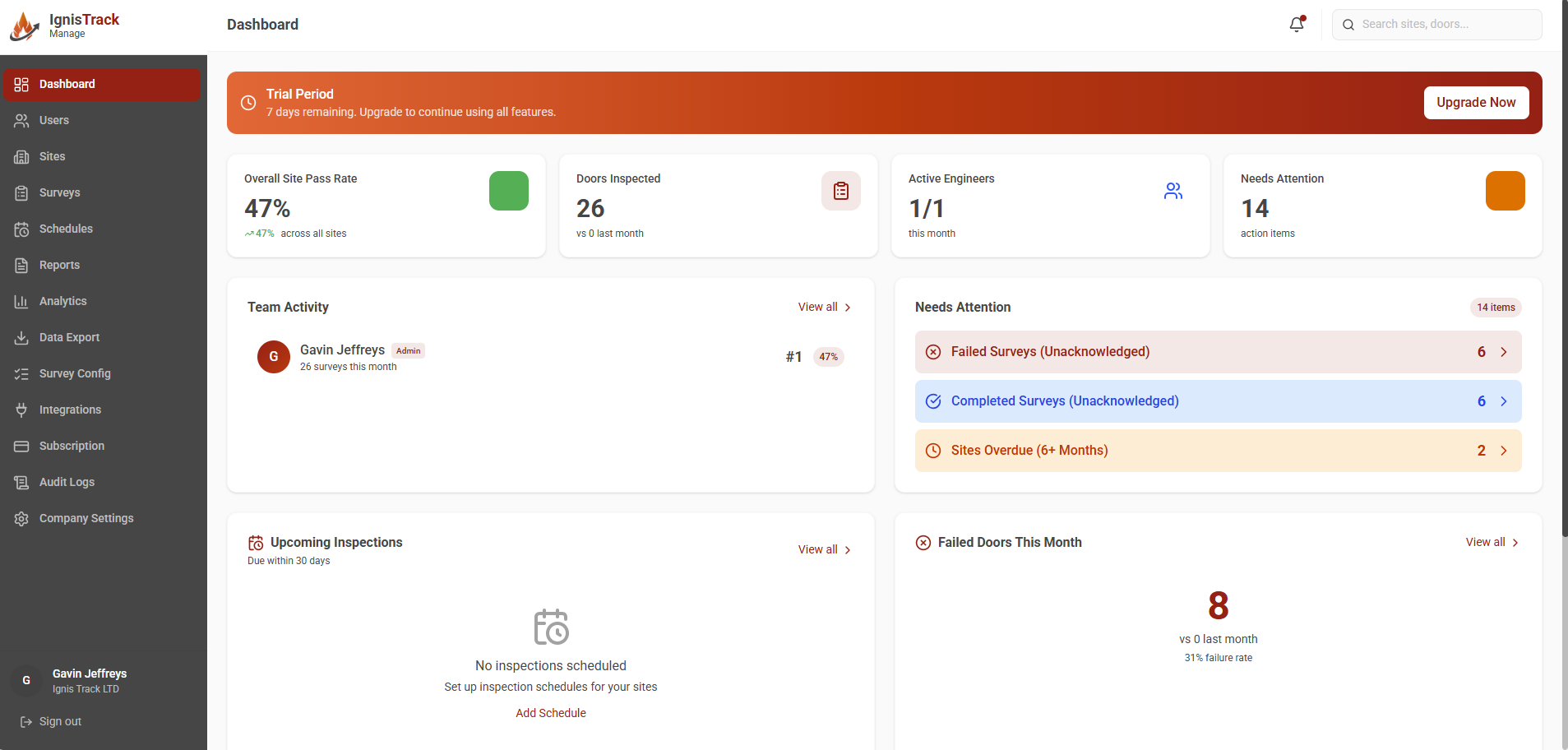
Photo Evidence That Stands Up to Scrutiny
Timestamped photos linked to specific components and defects. Embedded in reports automatically. No more hunting through camera rolls to match photos to doors.
How IgnisTrack Compares
| Feature | Clipboard & Paper | Generic Survey Apps | IgnisTrack |
|---|---|---|---|
| BS 8214 gap validation | — | Some | Full auto |
| Works 100% offline | Yes | Partial | Offline-first |
| Instant PDF reports | — | Basic | Professional branded |
| Bill of Materials | — | — | Auto Excel BoM |
| Repair specifications | — | — | During survey |
| QR code per door | — | — | Auto-generated |
| Custom defect codes | N/A | — | Full customisation |
| Photos in report | Manual | Some | Auto-embedded |
| Price remedial works | Spreadsheet | — | Auto from survey |
| Web dashboard | — | Basic | Full management |
IgnisTrack is the only fire door inspection software with built-in Bill of Materials generation and repair specification capture.
Simple Per-Seat Pricing
All features included. No tier restrictions. Volume discounts for teams.
14-day free trial. No credit card required.
Free Fire Door Survey Resources
BS 8214 Inspection Checklist 2026
Free downloadable checklist aligned with BS 8214:2016 code of practice.
Gap Measurement Guide
Correct tolerances for standard and smoke doors, how to measure, and common mistakes.
Defects: Repair or Replace?
When can defects be repaired vs when does the door need replacing?
Fire Door Surveyor App FAQ
How does IgnisTrack help me survey more doors per day?
IgnisTrack's guided 4-step workflow eliminates manual note-taking and report assembly. Defect codes, repair specifications, and materials are captured during the survey. PDF reports generate instantly on submission — no office admin needed. Surveyors typically complete 30-50% more inspections per day.
Does IgnisTrack really work offline?
Yes. IgnisTrack is built offline-first, not "works offline sometimes". Complete full surveys, capture photos, generate QR codes, and add new doors — all without internet. Data auto-saves every 5-10 seconds locally and syncs automatically when you reconnect.
How does IgnisTrack help me price remedial works?
During your survey, IgnisTrack captures exact repair specifications for every defect — hinge sizes, seal widths, closer types, material quantities. One click generates a complete Excel Bill of Materials with per-door material breakdowns, labour hour estimates, and cost calculations. Set your hourly rate once, and pricing calculates automatically. No other fire door inspection app does this — you can go from survey to quote in minutes instead of hours.
What BS 8214 features are built in?
IgnisTrack includes visual gap measurement with automatic pass/fail validation, smoke door threshold detection, 12-component inspection covering all BS 8214:2016 requirements, a comprehensive defect code library, and evidence level classification (Level 1-4).
Can I customise IgnisTrack for my company's processes?
Yes. You can add custom defect codes, define standard remedy actions, and build your own materials library. Company-specific options take precedence over system defaults, so your team works consistently with your established processes.
What does the PDF report include?
Every PDF report includes a branded cover page, door-by-door information (configuration, fire rating, evidence level, dimensions), gap measurements with BS 8214 pass/fail validation, component inspection results with specific defect codes and remedial actions, and timestamped photos embedded alongside the relevant components. Reports generate instantly when you submit a survey — no typing, no formatting, no evening admin.
Is there a web dashboard for managing sites and reports?
Yes. The IgnisTrack web dashboard at manage.ignistrack.com gives you a complete overview of all your sites, doors, and survey history. Download PDF reports, generate Bill of Materials exports, manage your team with invite codes, and customise your defect codes and materials library. Your phone is for surveying — the dashboard is for managing everything else.
How much does IgnisTrack cost?
IgnisTrack starts at £49 per user per month with volume discounts for teams (as low as £35/user for 20+ users). All features are included — no tier restrictions. Every new account gets a 14-day free trial, no credit card required.
Are you a building manager or responsible person looking for fire door compliance software?
See how IgnisTrack helps building managers maintain complianceSurvey, Report, and Price Remedial Works — All in One Visit
Start your 14-day free trial. Full access to every feature. No credit card required.